ID-Shield
How to Share a Copy of Your ID or Passport Safely
Sooner or later someone asks for a copy of your passport: a letting agency, a new employer, a car rental desk, a hotel, a website you are signing up to. Most of these requests are routine. But a clear photo of your ID page is exactly what someone needs to pretend to be you, and once you have sent it, you no longer decide where it goes.
You do not have to refuse. You can make the copy you hand over worth much less to anyone else: ask whether a copy is needed at all, black out what the recipient does not need, mark it with who it is for, send it carefully and make sure it is deleted. Where something is a legal point, we say which country it comes from. Check your own country’s rules: this is practical advice, not legal advice.
Why a copy is worth protecting
Switzerland’s Federal Office for Cyber Security (BACS) described a typical case in June 2026. A fake job offer for parcel forwarding asked applicants for photos of their passport, ID card and driving licence. According to the BACS, scammers use ID documents gathered this way to order expensive goods in the victim’s name, and show the ID copy when an online shop asks for identification. Its advice: ID copies and bank details only become relevant once you actually have the job.
Cifas, the UK fraud prevention service, recorded more than 242,000 cases of identity fraud in 2025, 54% of all the cases in its National Fraud Database. And the European Data Protection Board notes that so many organisations ask for ID copies (it names hotels, banks and car rentals) that a copy is generally not a reliable way to prove who someone is.
First, ask whether they need a copy
Often, seeing the original is enough. The ID card portal of Germany’s Interior Ministry (BMI) says that when you show your ID in person, a note that it was shown is often sufficient. The Dutch government says recording the type of document and its number is often enough, and an organisation that wants a full copy must explain why, or name the law that requires it.
Timing matters too. In Switzerland, the Federal Data Protection and Information Commissioner (FDPIC) says a landlord may ask for a copy of your ID only once you have been chosen as the tenant and the lease is being drawn up, not from everyone who applies. The BACS gives the same advice for job applications: wait for the offer. And the federal rules that make Swiss hotels register foreign guests have the host fill in a registration form from your document, which you sign: you show your ID, you are not asked to leave a copy. Cantons can add rules of their own.
When a full copy is the law
Sometimes a complete copy is required. In England, landlords check a tenant’s original documents with the tenant present and keep a copy for the tenancy and one year after. UK employers keep copies from right-to-work checks for the employment and two years after. In Germany, the BMI’s portal names laws that allow or require full copies, such as the anti-money-laundering law banks work under, which asks for the document number.
There, blacking out fields can defeat the purpose. You can still ask how the copy will be stored and when it will be deleted.
What to black out
Where a full copy is not required, official guidance agrees on the principle: leave visible only what the recipient needs, usually your name and date of birth, and hide the rest. The details differ.
| Source | Can usually be blacked out | Keep visible |
|---|---|---|
| Germany, BMI ID card portal | The access number (CAN) and the document number, unless a law such as the anti-money-laundering law requires it; often also height, eye colour, signature and the machine-readable zone | For many purposes: name, date of birth, place of residence |
| Switzerland, FDPIC (copy sent with a data access request) | Height, photo, document number | Name and date of birth |
| Netherlands, government.nl | Photo, signature, citizen service number (BSN), including in the number line at the bottom | Only the details needed |
| EU, European Data Protection Board (access requests) | Access and serial number, nationality, height, eye colour, photo, machine-readable zone | Unless national law requires a full copy |
Two things are easy to miss. The document number: German guidance says to hide it, but a bank or a UK landlord may need it, so if you are unsure, ask which fields they need, as the BMI suggests. And the machine-readable zone, the two or three lines of letters, numbers and < signs at the bottom of the page. It repeats your name, document number and date of birth, so a number you blacked out at the top can still be read at the bottom. The Dutch guidance says this explicitly for the BSN.
How you black it out matters as much as what. On paper, the BMI recommends a thick black felt pen, not a highlighter or a ballpoint. On a computer, the data should really be removed, not just covered: blacked-out parts should not be readable or recoverable by technical means. If in doubt, the BMI suggests blacking out a printed copy and scanning it again.
Mark the copy with who, what and when
In Germany this is the law. The ID card act (PAuswG, § 20) and the passport act (PassG, § 18) say a copy may be made only by the holder or with the holder’s consent, that it must be clearly and permanently recognisable as a copy, and that nobody but the holder may pass it on to third parties. The BMI adds: mark the copy with its purpose and the date.
Elsewhere it is advice, and it is the same advice. The Dutch government says to write on it that it is a copy, who it is for and the date. The French Ministry of the Interior recommends a watermark with the date, the recipient and the purpose, and the French government runs a free online service for adding one, Filigrane Facile. The Dutch government has a free app of its own, KopieID, that crosses out details and adds the purpose and date.
A copy that says which booking it was made for, and when, is awkward to present anywhere else, and if it turns up where it should not, it tells you which copy leaked. Put the text across the page, over the details, not in a corner where it can be cropped off.
Send it carefully, then make sure it is deleted
The BMI recommends handing over a paper copy or sending an encrypted file, and avoiding plain e-mail. Upload to the organisation’s own portal when it has one, and be wary of anyone who asks for one through a classified-ad site: the BACS says not to send an ID or passport copy there, whether you are buying or selling.
The BMI says a copy should be destroyed once its purpose is met. In Switzerland, the FDPIC’s guidance says that once the lease is signed, a landlord must destroy the other applicants’ forms and attachments. Where a law sets a retention period, as in the UK, ask when it ends.
Keep a note of when you sent a copy, to whom and what for; the BMI says this helps if a fraud attempt comes to light. If a copy ends up in the wrong hands, follow your own country’s advice. In Switzerland, the BACS says to report it to your municipality’s ID and passport office; in the UK, the Information Commissioner’s Office points you to the issuer and the police for lost or stolen documents, and to Cifas Protective Registration.
Where ID-Shield comes in
We made ID-Shield, for iPhone, for exactly this routine. You add a document by scanning it with the camera, picking a photo or importing a PDF. The app opens with Face ID, Touch ID or your device passcode, and locks again when you leave it.
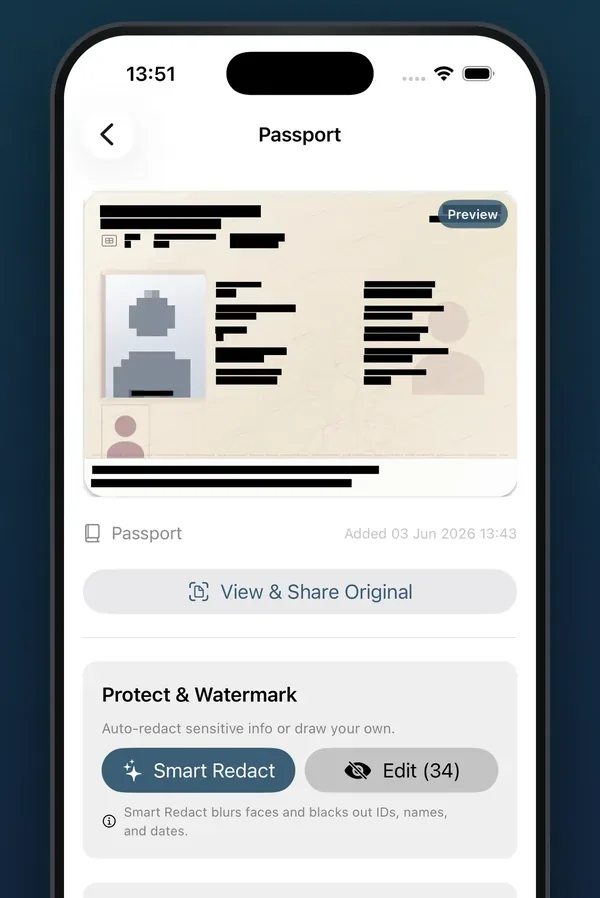
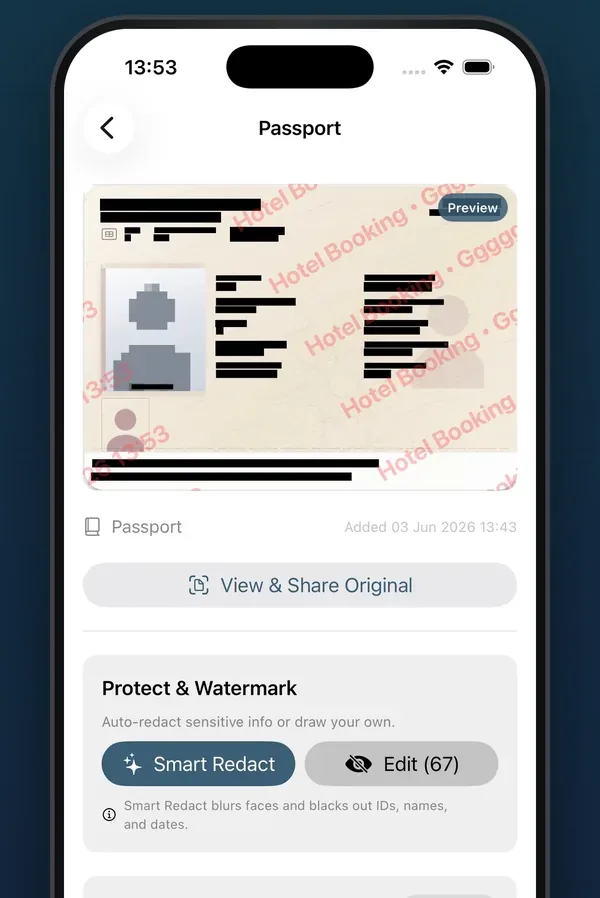
Smart Redact uses Apple’s Vision framework to find every line of text on the page and black it out, and blurs any face it finds. You then tap the fields the recipient does need, such as your name, to bring them back. You can also draw your own boxes and choose a style for each: Solid, Blur, Mosaic or Stamp. For numbers and names, Solid is the one to use, the app’s version of the thick black pen. The boxes are drawn into a new image, and the PDF is made from that image, so there is no layer on top for anyone to lift off.
The watermark needs a purpose and a recipient, and the app adds the date and time itself, in one line of text: purpose, recipient, date. You choose a single line or Full Splash, which repeats the text diagonally across the page, and set the colour, opacity, size and position. Purposes you use often can be saved as presets. You share the result as an image or a PDF through the usual share sheet, or save it to Photos (on the Mac, to a file).
Every watermarked copy is kept in History, with its purpose, recipient and date, so when it is time to ask for a copy to be deleted, you know who has one. There is no account, and the app’s code makes no network calls of its own and contains no analytics: your documents stay in the app until you share a copy.
ID-Shield is free to download, and your first watermarked copy is free. After that, a one-time purchase unlocks unlimited watermarks; there is no subscription. It is on the App Store only, for now.
Watermark your next ID copy
ID-Shield is free to download and your first watermarked copy is free; a one-time purchase unlocks unlimited copies.