AsterBridge
Mind Map vs Outline: When Each One Helps You Think
Mind map or outline? Both hold the same thing: a main idea, a few branches, and smaller ideas under each branch. The difference is order. A mind map has none, so use it while you are still finding your ideas: brainstorming, getting to know a new topic, seeing a whole project at once. An outline puts everything in a line, so use it when the order is the point: an essay, a talk, a report, a step-by-step plan. For most real work you want both, in that order: map first to find what you have to say, then outline to decide what comes first.
This post gives you a quick test for choosing, walks through notes, essays and planning, and says honestly what the research on mind mapping does and does not show.
Mind map vs outline: the same tree, drawn two ways
A mind map puts the main idea in the centre and lets branches grow out in every direction. An outline puts the main idea at the top and lists everything below it, with indents for the smaller ideas. Underneath, they are the same structure: every idea belongs to one bigger idea. You can turn one into the other without losing anything. The centre of the map becomes the title, each main branch becomes a top-level line, and each twig becomes an indented line under it.
So the choice is about what each shape makes easy to see.
| Mind map | Outline | |
|---|---|---|
| Order | None | Top to bottom |
| Shows best | How much there is, and where | What comes next |
| New idea goes | Anywhere | In its place in the line |
| Reads like | A picture | A first draft |
A map shows balance. A branch with one lonely idea stands out, and so does a branch with twelve that should really be two. An outline shows sequence. You read it the way your reader will read the finished piece, so you notice when point four depends on something you only explain in point six.
A quick test: is the order the point?
Three questions settle most cases.
Do you know your ideas yet? If you are starting from a blank page, a mind map is kinder. Every new thought has somewhere to go, and you do not have to decide whether it is point two or point five. An empty outline quietly asks for point one first, which is often the hardest one to write.
Will the result be read or heard in a line? Essays, speeches, emails, instructions and agendas all reach people one sentence at a time. Whatever you started with, finish with an outline, because that is the shape the reader gets.
Do ideas connect across groups? In an outline, every idea sits in exactly one place. In a mind map you can also draw a line between two branches when an idea belongs to both. If those cross-links are what you are trying to see, stay with the map.
When to use a mind map
Brainstorming
Say you are moving to a new flat. Put “Move” in the centre and add branches as they come to you: paperwork, packing, money, the old flat, the new flat, people to tell. Ideas arrive in no particular order, and a map lets you catch them as they come. Keep each idea to a word or two. A map full of sentences is an outline in disguise, and harder to read than one.
Getting to know a new topic
When you start studying something, put the topic in the centre and add what you already know. The thin branches show you where your gaps are before an exam does. As you read more, the map fills in, and you see the whole subject at a glance.
Seeing a whole project
Projects have parts that run at the same time and depend on each other. A map shows all of them on one screen, so you can explain the shape of the work or spot what nobody has picked up yet.
When to use an outline
Essays, reports and talks
An essay is read in one order, so its plan should be in that order. An outline lets you check the argument before you write it: the claim at the top, each supporting point beneath it, the evidence under each point. If a point has no evidence under it, you see the empty line. If two points say the same thing, they end up next to each other and you notice. A talk is even more linear, because listeners cannot skip back: each top-level line becomes a section.
Notes on material that already has an order
A lecture, a chapter or a meeting with an agenda comes to you in a sequence. Following it in an outline is fast: a new line for each point, an indent for each detail.
Step-by-step plans
Anything where step three cannot happen before step two, such as a recipe, a set of instructions or a checklist for a trip, belongs in an outline.
Notes, essays and planning: using both
The two work best as stages of the same job.
For an essay, map the question first. Put the question in the centre and empty your head: arguments, examples, objections, things you half-remember. Then choose the branches that actually answer the question, put them in the order your argument needs, and write that order down as an outline. The branches you did not choose are the material you are cutting, and it helps to see them before you let them go.
For notes, outline during the lecture or the reading, because that keeps up with the speaker. Afterwards, redraw the main points as a map from memory. The redrawing is the useful part: it makes you decide what the main branches were, and the gaps show you what to look up.
For planning, map the project to see all of it, then outline each branch as a list of tasks in the order they need to happen.
What the research says about mind maps
One controlled study is worth knowing, and it is a small one. In 2002, Farrand, Hussain and Hennessy tested the mind map study technique with 50 second- and third-year medical students in London. Everyone first took a short test on a 600-word passage. Then the students were split at random: one group was trained in mind mapping and applied it to the passage, the other studied it with whatever methods they normally used. Recall was tested straight afterwards and again a week later.
Both groups remembered more than at the start. After a week, only the mind map group’s gain had held up firmly. Their factual knowledge was about 10% higher, adjusting for the starting test, but the uncertainty around that figure ran from 1% lower to 22% higher, so on its own it is not conclusive. The mind map group also felt less motivated by their technique. The authors estimated that with equal motivation the advantage would have been 15%, and concluded that mind maps work as a study technique for written material, but that people need a way to stay motivated using them.
Read it for what it is: one small study, one passage of text, factual recall. It did not compare mind maps with outlines, and it says nothing about writing essays or planning projects. It is a reasonable argument for mapping what you have read when you want to remember it, not proof that one shape suits every job.
Where AsterBridge comes in
AsterBridge is our mind-mapping app for iPhone, iPad and Mac, and it is built on the point this post started with: a map and an outline are the same tree. Version 2.0, which brings everything below, is out on the Mac now; iPhone and iPad get it with their next update. Every map can be shown as Canvas, as Outline, or on iPad and Mac as Canvas + Outline side by side. They are the same data, so an idea you type in the outline appears on the map.
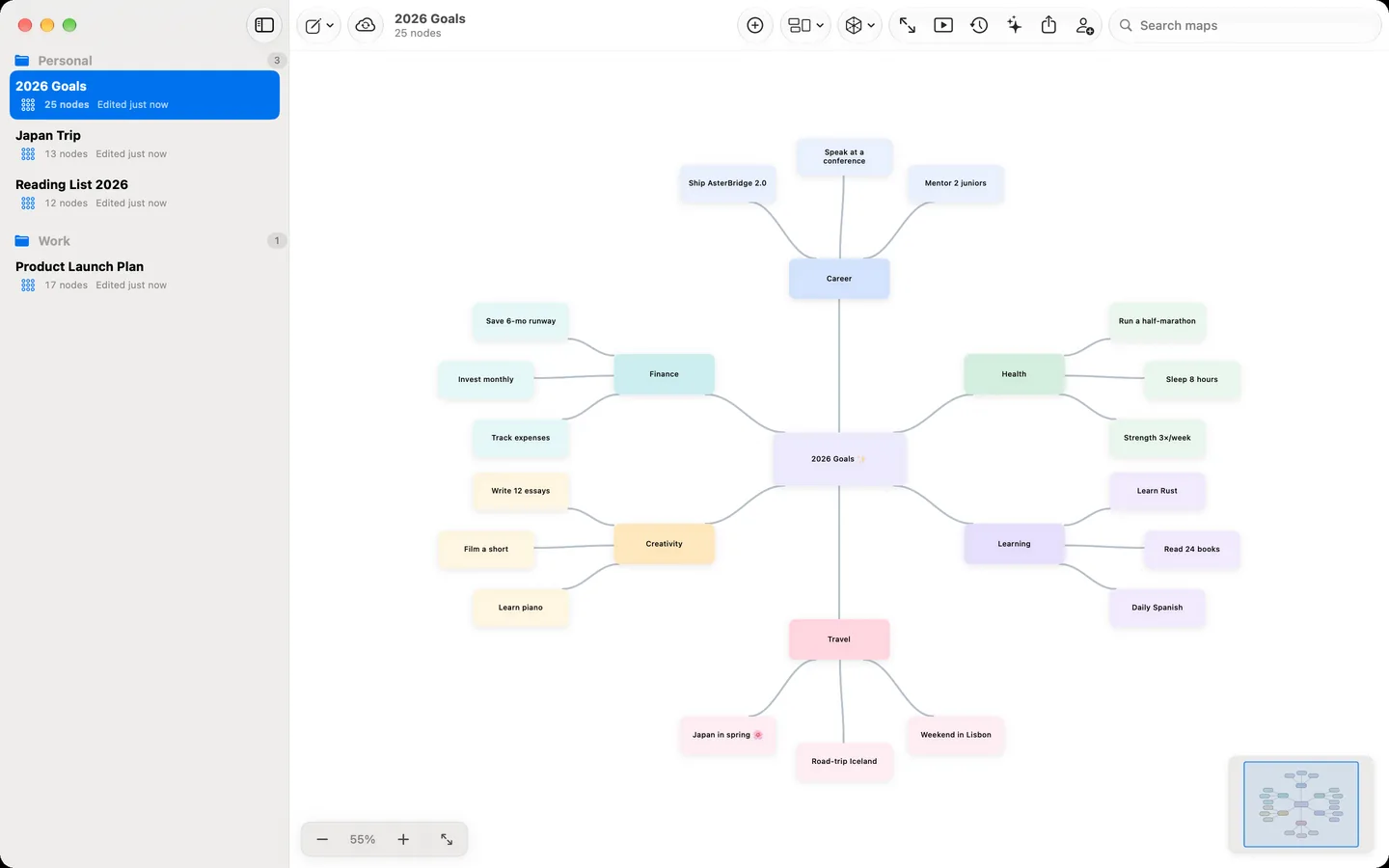
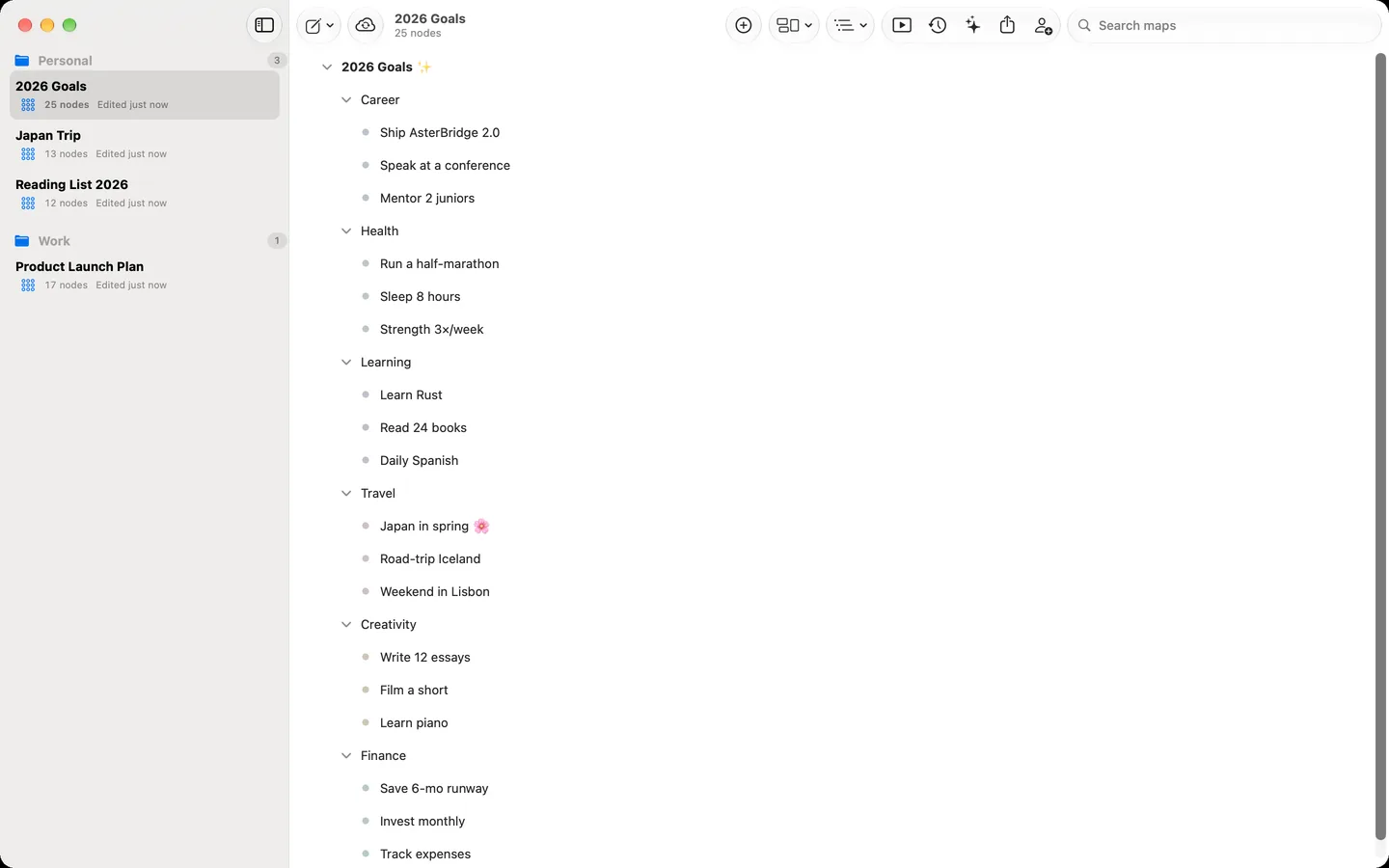
The outline behaves the way you would expect. Return adds the next idea at the same level, and Return on an empty line steps back out a level. Tab indents and Shift-Tab outdents. Branches fold away when you want to look at one part only. The outline lists the branches; lines you draw across branches stay on the canvas.
It also works the other way round. Paste as Map takes an indented list or Markdown headings and makes a map from them, and Photo of Notes reads a photo of handwritten or printed notes with text recognition on your device, turns the indentation into branches, and lets you correct the text before the map is made. Your maps sync through iCloud to your devices signed in to the same Apple Account.
AsterBridge is free to start, with up to three maps and PNG export, and the outline view is part of the free app. AsterBridge Pro is a subscription. It adds unlimited maps, more export formats (PDF, Markdown, which writes the map out as an indented outline, and OPML), inviting people to view or edit a map through iCloud, and the AI assistant. The assistant can expand an idea, summarise a branch, turn a passage of text into a map or suggest connections. It runs on Apple Intelligence on your device where that is available, or you can connect your own account with a cloud AI service.

See every map as an outline
AsterBridge 2.0 is out on the Mac. It is free to start, with up to three maps, the outline view and PNG export.