Canvary
How to Start Journaling: A Beginner's Guide That Sticks
To start journaling, make five small decisions once and then stop deciding: where you write, when you write, the least you will write, what you will write about, and what you will do after a missed day. A good first answer for most people is the same notebook or app every day, right after something you already do, three lines or five minutes, one question, and no catching up. Write the date, answer the question, close the journal. After a week, read back what you wrote and adjust.
If you have started a journal before and stopped after a week, the plan was probably too big, not you. This guide is for beginners and restarters. It gives you a first week of prompts, what to do when you get stuck, and what one well-known study on habits says about missed days. At the end we show where our diary app, Canvary, fits in, and where paper does the job just as well.
How to start journaling: five decisions to make once
Most journals stop for practical reasons. The notebook was in the other bag, the evening got late, the blank page asked for too much. Decide these five things before your first entry and you remove most of those reasons.
| Decide | A good first answer |
|---|---|
| Where | The one you will have with you at that time: a notebook by the bed, or your phone |
| When | Right after something you already do every day |
| How much | Three lines, or five minutes. More is a bonus |
| What | One question a day, chosen in advance |
| After a missed day | Write today’s entry. Never catch up |
Paper or phone? Paper has no notifications and nothing to update. A phone is always with you, can be searched and can be locked. Neither is the better journal. The better one is the one within reach at the moment you planned to write.
Tie it to something you already do. “After I make my morning coffee” or “after I brush my teeth at night” is easier to keep than “sometime in the evening”. The existing routine is the reminder.
Set a minimum you can meet on a bad day. The minimum is not your goal; it is the floor. On a good day you will write more. On a tired day, three lines still count, and the habit survives.
What to write: journaling for beginners
The hardest part of a first entry is the blank page, so don’t face one. Start with the date and use one of these simple shapes:
- Three lines. What happened, one thing you noticed, what’s next.
- One question. A prompt chosen the day before, so you don’t spend your five minutes choosing.
- A list. Three good things, three things on your mind, three things to do tomorrow.
- A picture. A quick drawing, a ticket stub, a photo with one sentence under it. A journal does not have to be all words.
Spelling, grammar and neat handwriting don’t matter. Nobody marks a journal. If you notice yourself writing for an imagined reader, write the next sentence just for you.
Your first week, day by day
Here is a first week you can copy. The questions come from the prompt library in Canvary, but they work just as well on paper.
| Day | What to write |
|---|---|
| 1 | The date and three lines about today |
| 2 | “What made you smile this morning?” |
| 3 | “What’s the first thing you noticed when you woke up?” |
| 4 | “Write a six-word story about your day.” |
| 5 | “Describe an emotion you felt today that surprised you.” |
| 6 | “What’s one thing you want to accomplish this week?” |
| 7 | Read days 1 to 6, then: “What’s one thing you’d do differently this week?” |
Day 7 matters. Reading back is where a journal starts to pay off: you see what you would have forgotten, and you see which kind of entry you enjoyed. Keep more of that kind in week two.
How to keep a journal habit
Starting is the easy part. Keeping going is where the five decisions earn their place, and where it helps to know how long a new habit really takes.
In a 2010 study published in the European Journal of Social Psychology, 96 people each chose one new daily behaviour, such as a drink, a food or a short bit of exercise, tied to a daily cue, for 84 days. Each day they reported whether they had done it, and they answered questions about how automatic it felt. On average it took 66 days to reach the point where it stopped getting more automatic, and individual times ranged from 18 days to a predicted 254. A single missed day had little effect on later progress, though many missed days added up.
The study was about eating, drinking and exercise, not writing, so treat its numbers as a rough guide. Two lessons still carry over. Expect a couple of months, not a few weeks, before journaling feels automatic. And a missed day is not a failure. Write the next entry and carry on.
A few more things help:
- Don’t catch up. Writing three entries on Sunday for the days you missed turns a small habit into a debt. Skip the gap, or write one line about it, and do today.
- Keep it in sight. A notebook on your pillow or next to the kettle, or the app on your first Home Screen page. Out of sight is out of mind.
- Lower the bar, don’t skip. On a busy day, write the minimum. One sentence keeps the routine alive better than a planned long entry that never happens.
- Watch how streaks feel. Counting days in a row motivates some people. If a broken streak makes you want to give up altogether, stop counting.
- Review once a month. Read the month back and change one thing: the time, the prompt, the length.
When you get stuck
Almost everyone hits one of these. Each has a simple fix.
“Nothing happened today.” Write about one small thing instead of the whole day: a meal, a walk, a sound. A prompt like “What’s the funniest thing that happened today?” makes you look for something, and there usually is one.
“It feels like homework.” Change the shape, not the habit. Switch from sentences to a list, from a list to a drawing, or try the six-word story. A playful entry still counts.
“I’m worried someone will read it.” You will write more honestly if you know it is private. Keep a paper journal somewhere only you go, or use an app with a lock.
“I keep writing the same thing.” That is information. If the same worry or the same good moment comes up every week, it may deserve a longer entry, or a conversation with someone.
A journal is a place to think things through. It is not a treatment, and it does not replace talking to people. If writing brings up something heavy, tell someone you trust, or speak to a professional.
Where Canvary comes in
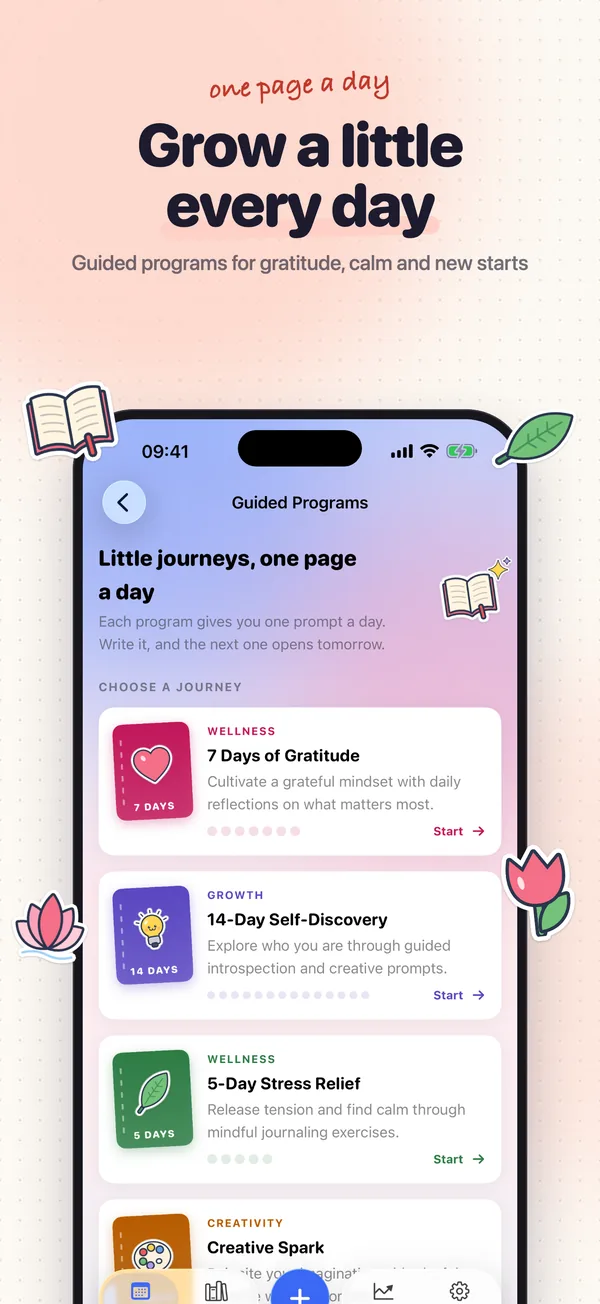
Canvary is our creative diary for iPhone and iPad, and version 2.0 has a tool for each part of the plan above. The prompts in this post’s first week come from its library of 300 prompts in ten themes, from gratitude to just-for-fun, with a prompt of the day if you would rather not choose. If you want more structure, six guided programs of 5 to 14 days give you one prompt a day, and the next opens the following day. Miss a day and the program does not skip ahead: you continue with the prompt you had not written yet.
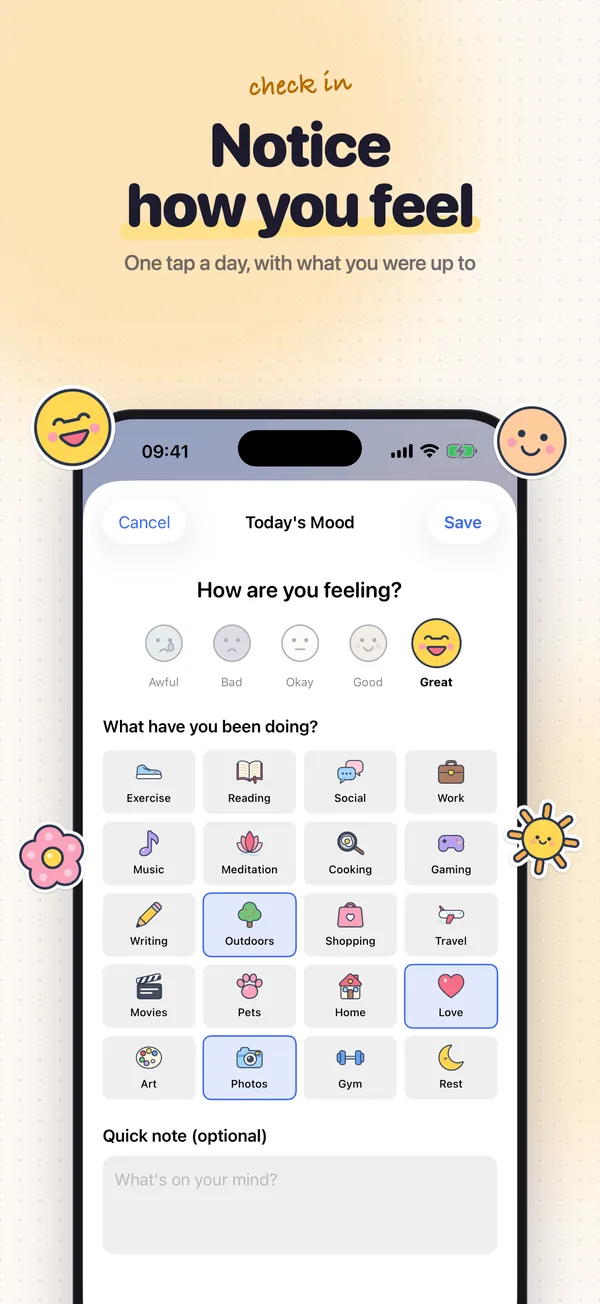
Each entry is a page: write, draw, add photos and choose from 56 doodle stickers, in one of four app styles. For the days when three lines feel like too much, the mood check-in is a tap on one of five doodle faces, the activities you did, and an optional note. Insights then shows your moods over 7, 30 or 90 days: the trend, your average, your best weekday and the activities you log most. On devices that support Apple Intelligence, with iOS 26, Insights can also add a short written reflection made by Apple’s on-device model.
For keeping it in sight, there are Home Screen widgets for the daily prompt, your journaling streak, today’s mood and today’s entry. For privacy, you can lock the app with Face ID, and iCloud sync stays off until you switch it on.
Every feature is free. The free version holds up to 10 entries, and one Lifetime purchase removes the limit, with no subscription. An app will not write the entries for you, and a notebook works just as well if that is what you will reach for. Pick the one that is in your hand at the moment you planned to write.

Start your first page
Every feature is free, for up to 10 entries; one Lifetime purchase removes the limit.